
Why Your Chiropractic Facebook Leads Suck (and How to Fix Them)
Bad chiropractic Facebook leads? Diagnose the real cause (cold offers, loose targeting, the wrong form, slow follow-up) and fix it with an educate-first funnel.
Chiropractic Facebook leads go bad when a discount is shown to cold strangers who weren't looking for a chiropractor, through a two-tap form, then followed up too slowly. Fix it by teaching first with short videos, making the offer mainly to people who watched, adding a little form friction, and calling within minutes.
TL;DR (updated November 2026): Your Facebook leads aren’t bad because Facebook is broken. They’re bad because nobody opens Facebook to find a chiropractor, and a discount shown to cold strangers through a two-tap form attracts deal hunters who never pick up. Fix it in four steps: teach a cold local audience with short videos, retarget the people who watched, make the offer with a little friction (a higher intent form, a few questions, or a landing page), and call every lead within minutes. Then judge it by cost per new patient who shows up, not cost per lead. And learn Meta’s health and wellness data rules, because they change what chiropractors can retarget.
If you’ve run Facebook ads for your practice, you probably know this list by heart:
- Phone numbers that don’t work.
- Leads who answer once and then ghost you.
- Leads who never answer at all.
- Appointments that don’t show.
- New patients who come in for the special and never come back.
You’re not alone, and you’re not doing it wrong because you’re bad at marketing. You were probably sold the wrong expectation. Somebody told you a new patient special campaign would fill your schedule. It filled your CRM with names instead.
Here’s the thing to understand first: people don’t go to Facebook to look for a chiropractor. Facebook is a social feed, not a search engine. People open it to see their friends, their kids’ photos and their neighbor’s dog. If you want people who are already looking for a chiropractor, that’s Google and your Google Business Profile. Facebook is where you create the demand, not where you catch it.
When you skip that step and push a discount at everyone in a 10-mile radius, you attract online couponers who liked the price. That’s not a Facebook problem. It’s a strategy problem, and it’s fixable. I walk through the whole idea in this training:
Why Chiropractic Facebook Leads Go Bad
Think about a normal marketing funnel: awareness at the top, consideration in the middle, the decision at the bottom. A new patient special ad is a bottom-of-funnel ask. Running it to cold strangers skips everything above it.
Most of the people driving past your office every day don’t know what you actually do. Some of them need you and have no idea. So when your ad says “$49 new patient exam,” the only people who raise a hand are the ones who already wanted a deal. The people who would become great, committed patients don’t know you yet, so they scroll right past.
Then Meta’s system makes it worse in a very logical way. When you optimize for leads, Meta looks for the people most likely to fill out your form, and it gets very good at finding them. That’s not the same thing as the people most likely to show up and start care. Feed it a cold audience and a frictionless form, and it will happily find you lots of cheap form-fillers.
Three things almost always stack up:
- Cold audience. The offer goes to people who’ve never heard of you.
- Too little friction. A prefilled form they can submit in two taps, sometimes by accident.
- Slow follow-up. By the time your front desk calls the next afternoon, they don’t remember you.
For context on what practices are spending, our State of Chiropractic Marketing report found the median practice paid $33.11 per Meta lead and spent about $718 a month (November 2025 to October 2026), and 83% of those leads came from Meta’s Instant Forms rather than practice websites. Cheap, easy leads are the norm. That’s exactly why quality is the problem.
The number that matters is cost per new patient who shows up, not cost per lead. We break down that math, with a worked example, in Facebook lead quality for chiropractors.
Diagnose It: Symptom, Likely Cause, Fix
Before you change anything, figure out which bad you have. Different symptoms point to different broken parts:
| Symptom | Likely cause | Fix |
|---|---|---|
| Fake or wrong phone numbers | Two-tap Instant Form, accidental taps | Switch to a higher intent form, add a scheduling question, or use a landing page |
| Leads don’t remember filling out the form | Cold audience plus slow follow-up | Retarget video viewers first; call within minutes |
| Leads answer but say “just checking prices” | Offer shown to deal seekers | Lead with education; make the offer mainly to people who watched |
| Lots of bookings, lots of no-shows | No commitment and no reminders | Confirmation call plus text and email reminders; consider a deposit |
| Patients come once and never start care | Price-driven offer, no understanding of chiropractic | Educate before the offer; rethink your new patient special pricing |
| “Retargeting” ads reach total strangers | Custom audience added only as an Advantage+ suggestion | Use the audience as a control (further limit your audience) for true retargeting |
| Leads come from outside your area | Location setting too wide, or reach expanded past it | Tighten the radius; keep location as a hard control |
| Lead count looks fine, but your team can’t keep up | More leads than calls | Add friction or automate first response with an AI front desk |
| Website leads and bookings vanished from Ads Manager | Website data restricted under Meta’s health and wellness rules | Check your dataset’s category in Events Manager; see the health rules section |
| Ad rejected or account restricted | Copy that implies the viewer’s health condition | Describe what you do, not what’s wrong with them |
Most practices find two or three of these at once. Fix the audience problem first. Form and follow-up fixes help, but they can’t turn strangers into warm prospects.
The Fix: Educate First, Offer Second
Instead of using Facebook to drive leads every day, use it to become the chiropractor your community already knows. Build awareness, earn some trust, then ask.
We call this the “jab, jab, jab, right hook” approach, after Gary Vaynerchuk’s book of the same name. The jabs are free, useful content. The right hook is the offer. Throw enough jabs and the right hook lands, because people already know who’s throwing it.
Here’s the whole system on one page:
- 1. Cold: educateShort educational videos shown to adults near your office. Goal: attention and trust. Judge by cost per video view.
- 2. Warm: retargetMore videos, articles and reviews shown to people who watched. Goal: familiarity. Judge by how many people watch more than one video.
- 3. Offer: invite them inYour new patient offer, mainly to the warm audience, through a form with a little friction. Goal: qualified leads.
- 4. Follow up: book themA call or text within minutes, then reminders until they walk in. Goal: a booked visit that shows up.
This takes longer than a straight lead campaign, and your cost per lead will usually go up. That’s fine. You’re buying fewer, better leads that turn into patients who already understand why they’re coming in. For a deeper build-out of this funnel, including how long to run each stage, see our chiropractic Facebook ads funnel.
Step 1: Teach a Cold Local Audience
The most powerful thing you can put in front of a stranger is something useful. Teach them about the problems you see every day, in plain language, in under a couple of minutes.
Educational content does four jobs at once:
- It educates. Most people don’t know what a chiropractor actually does. If everyone did, you’d barely need marketing.
- It gives value first. A tip about sleeping position helps someone whether or not they ever book. That’s how trust starts.
- It builds awareness. When people keep seeing you in their feed, you become the local name for this stuff.
- It builds rapport. People hire people they feel they know. Video lets them hear you before they ever meet you.
What to film
Short, direct-to-camera videos, usually under two minutes, each answering one question your patients ask all the time:
- How to pick a pillow or a mattress.
- How to lift a heavy box without wrecking your back.
- Desk setup tips for people who work from home.
- Simple stretches for stiffness after a long drive.
- What actually happens at a first chiropractic visit.
Make a list of the 20 questions you answer most, and that’s your first quarter of content. If getting on camera feels awkward, our guide to making better chiropractic videos covers the setup, the phone-level gear and the delivery. If you want to knock out a pile of them in one sitting, plan a practice media day.
Put money behind it
Posting the video on your Page isn’t enough, because organic posts mostly reach people who already follow you. Run the video as an ad to adults within driving distance of your office, with a campaign goal that rewards people actually watching, not clicking. Our chiropractic Facebook ads guide walks through the campaign settings and what to spend.
One rule for the ad copy: Meta’s advertising standards don’t allow ads that assert or imply personal attributes, including health conditions. So “Is your back pain ruining your sleep?” is a problem. “Three pillow tips from a local chiropractor” isn’t. Talk about the topic, not about what’s wrong with the viewer.
Real Client Video Examples
Examples from CHIROBASIX client practices. These are real videos we edited for two practices we work with. Every one follows the same recipe: the doctor on camera, one topic a local stranger already cares about, captions for people watching with the sound off, and a vertical frame made for the phone. Press play on a few and notice what they have in common.
Eagle Trace Spine & Sport (Burnsville, Minnesota): the jabs
Ten short educational videos, most of them 30 to 40 seconds. Each one answers a single question a patient has asked the doctor a hundred times. That’s the whole trick: you already know your best video topics, because patients ask you them every day. These are the videos you’d run to a cold local audience, then build your retargeting audience from the people who watch.
Eagle Trace Spine & Sport: the right hooks
Same doctor, same look, but these are written to ask for action. They’re longer (45 to 50 seconds), name a specific problem, and end with a clear next step. In the funnel above, these are what the warm audience sees after they’ve watched a few jabs.
Crystal Grove Chiropractic: selfie-style education
Shot on a phone, straight to camera, one condition per video. Selfie videos feel like a post from someone you know rather than an ad, which is exactly why they work in the feed. If you’ve been putting off video because you don’t have a crew, start here.
What these videos have in common:
| Ingredient | Why it matters on Facebook and Instagram |
|---|---|
| One topic per video | A stranger decides in a second or two whether it’s for them. One clear problem makes that easy. |
| The doctor on camera | People book with a person, not a logo. By the offer stage, they already know your face and voice. |
| Captions on screen | Plenty of people scroll with the sound off. Captions carry the message anyway. |
| Vertical 9:16 frame | It fills the phone screen in Reels, Stories and the feed. |
| Under a minute (mostly) | Short videos get watched to the end, and the people who finish them are your warmest audience. |
| No price in the jabs | The educational videos build trust. The offer comes later, to the people who watched. |
Want to make your own? Our guide to making better chiropractic videos for Facebook ads covers setup, lighting and what to say.
Step 2: Retarget the People Who Watched
Once people watch your videos, Meta lets you build a list of them and keep showing up in their feed. That’s where strangers turn into warm prospects.
Video engagement custom audiences. In Ads Manager you can build an audience of people who watched your videos on Facebook or Instagram. As of October 2026, Meta simplified the options to three: all video viewers (at least 3 seconds), engaged video viewers (at least 10 seconds, which includes ThruPlays) and highly engaged video viewers (at least 50% of the video). You choose how many days people stay in the audience, and it refreshes on its own.
For retargeting, start with engaged video viewers. Someone who stopped for three seconds hasn’t heard you say anything. Someone who watched ten seconds or more has.
Page and Instagram engagement audiences. Meta also lets you build engagement custom audiences from people who interacted with your Facebook Page, your Instagram professional account, your lead forms and more. Combine these with your video viewers for a bigger warm pool.
Then keep jabbing. Show the warm audience a different video next week, then another, then a blog post or a patient review. Keep yourself in their feed with useful stuff. After a few weeks, these people have seen you again and again. They know who you are, what you do, and that you’re worth listening to.
The Advantage+ trap
Here’s a setting that quietly ruins a lot of “retargeting” campaigns. Meta’s default is Advantage+ audience, and when you add a custom audience as an audience suggestion, Meta uses it as a starting point and can show your ad to other people when it thinks that will perform better. Meta’s own help page on Advantage+ custom audience says it can deliver beyond the audience you selected.
That’s great for an awareness campaign. It’s not what you want for an offer you meant to show only to warm viewers. If you want true retargeting, use your custom audience as an audience control (Meta calls it “further limit your audience”) instead of a suggestion. Otherwise your “warm” offer can end up in front of cold strangers, and you’re right back to bad leads.
Meta’s Health and Wellness Rules (Read This Before You Retarget)
This is the part most Facebook ads advice for chiropractors skips, and it matters. Meta treats health-related businesses differently, and a chiropractic practice is a health-related business.
Your website data may be restricted. Meta assigns categories to websites and apps that send it data through tools like the Meta Pixel and Conversions API. “Health and wellness” is one of the categories that can come with extra restrictions, and Meta’s definition includes provider and patient relationships and health-related services. According to Meta’s page on data sharing restrictions, a restricted data source can face:
- Core setup, which limits custom parameters and the parts of URLs after your domain.
- Restrictions on certain standard events, meaning specific mid and lower funnel events, the ones like leads and bookings.
- Full restrictions, where Meta’s business tools can’t be used for ads in the affected regions.
Meta’s own suggestion for advertisers in that position is to lean on more upper-funnel events, or on objectives that don’t depend on website data, like awareness, engagement and traffic. In accounts we manage, we’ve seen exactly this: chiropractic websites whose datasets were categorized as health and wellness, where standard lead events from the site never showed up in Meta at all. If your website leads seem to have vanished from Ads Manager, check your dataset’s category in Events Manager before you blame your tracking.
Audiences and conversions that point to a condition get flagged. Meta says it will flag custom audiences and lookalikes that suggest information it doesn’t allow, using a specific health condition like arthritis as its example. Flagged audiences can’t be used in new campaigns. The same goes for custom conversions. Meta’s prohibited information rules also say the names and criteria you choose for events, conversions and audiences must not reflect health information. So no audience called “sciatica video viewers” and no conversion built on a “/neck-pain-quiz-results” URL.
What this means in practice:
- Video and Page engagement audiences are your best retargeting tool. They’re built from what people do on Facebook and Instagram, not from data your website sends Meta. Name them by topic or date (“Video viewers, Nov 2026”), never by condition.
- Don’t promise yourself website-visitor retargeting or lead optimization from site events. It may work for your dataset, it may be limited, and Meta decides. Plan as if it won’t.
- Instant Forms keep the lead on Meta, which is one reason so many chiropractic leads come through them. That’s convenient, and it’s also why form settings and follow-up speed matter so much (next section).
- Never upload patient lists to Meta. Your patients’ information is health information. Keep it out of Meta’s tools entirely.
These rules change, and Meta applies them per dataset and per region. Check your own Events Manager, and talk to your compliance advisor about anything that touches patient data.
Step 3: Make the Offer (With the Right Form)
Now you have a warm audience. They’ve learned who you are, they know what you do, and they’ve shown interest by watching. Now is the time for the right hook: invite them in with your new patient offer.
These people are much more likely to book, show up, and stick with a care plan, because they came in already understanding why chiropractic might help them. You get to be the doctor instead of the salesperson.
How you collect the lead decides a lot about its quality. We cover the full six-step friction ladder (from two-tap Instant Forms to landing pages with pre-payment) in Facebook lead quality for chiropractors, so here’s the short version:
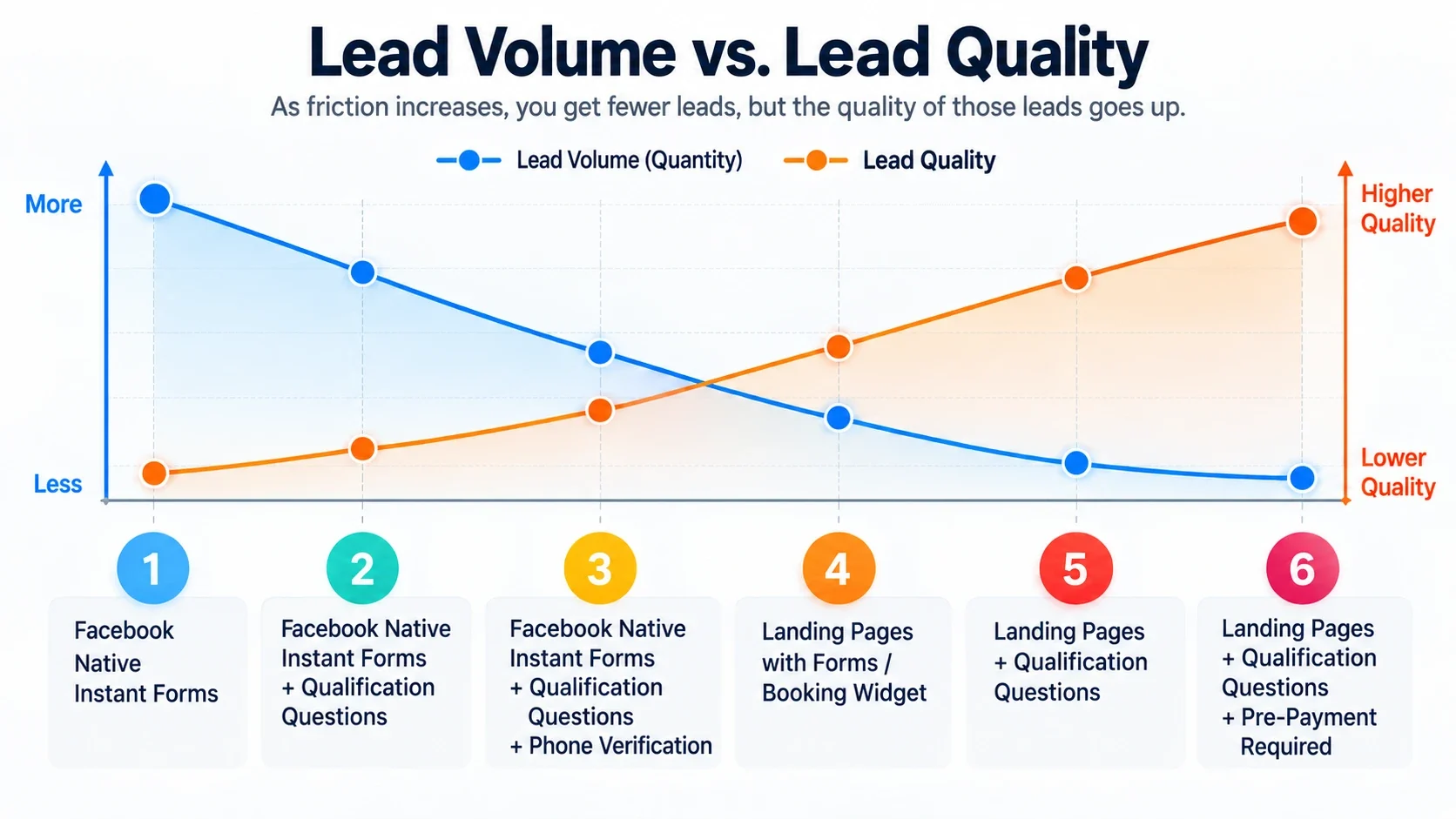
- Use the higher intent form type. Meta’s Instant Form types include “more volume” (the default), “higher intent” and “rich creative.” Higher intent adds a review screen so people confirm their details, plus a note that your business may follow up. Meta notes it only runs in Facebook and Instagram feeds on mobile.
- Add one to three custom questions. Meta lets you add custom questions (up to 15 in total), including multiple choice, short answer, and an appointment request question. Keep them about scheduling: best time to call, preferred day, which office, whether the visit is for them or a family member. Don’t ask about pain or conditions. Meta’s list of questions prohibited on Instant Forms includes health information like current or past ailments, and a form that breaks it won’t run. Save those questions for the phone call and the exam.
- Or send them to a landing page. A landing page with online booking brings fewer leads, but the people who book have read your page, seen your reviews and picked their own time.
- Price the offer on purpose. A very cheap special pulls in deal hunters. Read our guide to pricing your new patient special for volume vs. quality.
Two older ideas still hold up, too: a short qualifying step to filter tire kickers (on your own landing page, not an Instant Form, and still without collecting health details through the ad) and a deposit to reduce no-shows. They’re in our list of habits that get better Facebook ad results.
Tell Meta Which Leads Were Good
Meta can optimize for better leads, not just more leads, if you tell it which leads turned into patients. In Ads Manager, lead campaigns offer a performance goal Meta calls maximize number of qualified leads, which shows your ads to people more likely to convert after they submit. Meta says that since April 2026, new campaigns can only use it with a Conversions API integration that sends your CRM’s lead stages back to Meta.
Be realistic about whether it fits a chiropractic practice:
- Volume. Meta’s Conversions API for CRM guide lists good-fit guidelines that include at least 200 leads a month and data uploaded at least daily. Many single-office practices don’t hit that.
- Health data. Meta’s data sharing restrictions page says custom events are blocked until reviewed when a data source has restrictions. Lead stages should never carry health details anyway. A stage like “booked” or “showed” is fine. “Booked, low back” is not.
If you’re a multi-location group with real lead volume, it’s worth exploring with a developer or your CRM partner. If you’re a single office, your biggest wins are still the audience, the form and the follow-up.
Step 4: Follow Up in Minutes, Not Tomorrow
This is where most good leads die. Someone fills out your form on their lunch break, thinking about their back. If your front desk calls the next afternoon, that moment is gone. They don’t remember the ad, they don’t recognize your number, and they don’t pick up.
Speed fixes more “bad leads” than any targeting trick:
- Respond within minutes. A real person calling right away is best. An instant, friendly text that says who you are and offers times is the next best thing.
- Cover nights and weekends. Lots of Facebook leads come in after hours. An AI front desk can answer, text back and book while your team is home.
- Keep trying. One call isn’t follow-up. Plan several touches across calls, texts and email over the first week.
- Nurture the ones who aren’t ready. Some people need a few weeks. Put them in a simple email nurture sequence that keeps teaching, so you’re the practice they think of when they are ready.
- Confirm and remind. Booked isn’t showed. A confirmation call plus text and email reminders protect the slot.
A CRM like ENGAGE can fire that first text automatically and log every touch, so nothing depends on someone remembering.
Your 30-Day Fix Plan
Week 1: Find the leak
- Pull your last 30 days of leads and mark each one: reached, booked, showed, started care.
- Match the pattern to the diagnosis table above.
- Check your dataset’s category in Events Manager, and rename any audience or conversion that references a condition.
- Measure how fast your team actually calls new leads.
Week 2: Fix the bottom first
- Set up an instant text reply and a call-within-minutes rule (or an AI front desk for after hours).
- Switch your Instant Form to higher intent and add one to three scheduling questions (no health questions).
- Add reminders for every booked first visit.
Week 3: Start the jabs
- Film four to six short educational videos.
- Launch a video campaign to adults within driving distance of your office.
- Build engaged video viewer and Page engagement audiences.
Week 4: Aim the right hook
- Point your offer ad at the warm audience as an audience control, not just a suggestion.
- Keep a small cold-offer ad running only if you want a comparison.
- Track cost per new patient who shows up, by audience, and keep filming.
Expect cost per lead to rise. Give the warm audience a couple of months to build before you judge the whole system.
Mistakes That Keep Facebook Leads Bad
- Running only offer ads. All right hook, no jabs.
- Judging by cost per lead. The cheapest leads are often the most expensive patients.
- Calling tomorrow. Speed matters more than almost any ad setting.
- Treating a suggestion like a target. A custom audience added as an Advantage+ suggestion isn’t strict retargeting.
- Naming audiences after conditions. It can get them flagged, and it’s the wrong habit with health data.
- Copy that tells people what’s wrong with them. Against Meta’s ad standards, and it can get ads rejected.
- Stopping the videos once leads come in. The warm audience shrinks the moment you stop feeding it.
- Ignoring the offer price. A rock-bottom special attracts rock-bottom commitment.
- Uploading patient lists. Keep patient information out of ad platforms.
Facebook Leads and AI Search
The videos you make for Facebook do double duty. When someone asks Google’s AI Overview or ChatGPT about a chiropractor in your town, those systems lean on what they can find about you across the web. Educational videos posted to YouTube, answers on your website, and a steady stream of reviews all give them something to work with. Repurpose every Facebook jab: post it to YouTube with a clear title, embed it on a matching page of your site, and answer the same question in writing. Our guide to AEO and GEO for chiropractors covers how to make that content easy for AI assistants to cite.
Rethink Chiropractic Facebook Ads
This approach isn’t the fast, easy button. It takes some filming, a few weeks of patience and a front desk that calls quickly. But the leads you get will be people who know you, chose you and show up. That’s the whole game.
Facebook advertising works when you use it the way it was designed: as a place to be seen and trusted by your community, not a coupon board. To see how Facebook fits with Google, your website and reviews, read our complete chiropractic marketing guide. If you’d rather have a team build and run the whole funnel for you, that’s what our chiropractic Facebook ads program does.
Chiropractic Facebook Leads FAQs
Why are my chiropractic Facebook leads so bad? Usually three things stack up: a discount offer shown to cold strangers who weren’t looking for a chiropractor, a two-tap form that catches the mildly curious, and follow-up that comes hours later. Fix the audience, add a little form friction, and call within minutes.
Do Facebook ads work for chiropractors? Yes, when you use Facebook for what it’s good at: getting a lot of local people to see you teach. Practices that lead with short educational videos and make the offer to people who watched get warmer leads than practices that push a new patient special to strangers.
What is the jab, jab, jab, right hook strategy? It’s Gary Vaynerchuk’s idea of giving value several times before you ask for anything. For a chiropractor, the jabs are short educational videos shown to local people, and the right hook is your new patient offer, shown mainly to the people who watched them.
Can chiropractors still retarget on Facebook with Meta’s health rules? Often, yes, but carefully. Video and Page engagement audiences still work. Meta may restrict lower-funnel website events for health and wellness sites, and it flags custom audiences or conversions that point to a health condition, so never build or name an audience around a condition.
Should I use Instant Forms or a landing page for chiropractic leads? Instant Forms bring more leads and need a call within minutes to work. A landing page brings fewer, better-informed leads. If your team can’t call fast, start with a higher intent Instant Form with a few questions, or send people to a page with online booking.
What is a higher intent Instant Form? It’s a Meta lead form type that adds a review screen so people confirm their details before submitting, plus a note that your business may follow up. Meta says it only shows in Facebook and Instagram feeds on mobile. It trims accidental and half-hearted submissions.
How fast should I call a Facebook lead? Within minutes, while they still remember tapping your ad. The longer a lead waits, the more likely it goes cold or books somewhere else. If your front desk can’t answer that fast, use an automated text and an AI front desk to respond for you.
How long does an educate-first Facebook strategy take? Plan on a few weeks of education before the offer has a warm audience worth targeting, and a couple of months before you judge it. Cost per lead often rises. Judge it by cost per new patient who shows up, not cost per lead.
How much do chiropractic Facebook leads cost? In CHIROBASIX’s State of Chiropractic Marketing report, the median practice paid $33.11 per Meta lead and spent about $718 a month from November 2025 to October 2026. Cheaper leads aren’t automatically better: track cost per new patient who shows up.
What should a chiropractic Facebook lead form ask? Keep the prefilled name, phone and email, then add one to three scheduling questions: best time to call, preferred day, which office. Meta doesn’t allow Instant Form questions that ask about health conditions, so save those for the visit.
Prefer to listen? Hear the original version of this strategy on the CHIROBASIX Podcast. For organic posting that supports your ads, see our social media marketing playbook for chiropractors.
Keep reading
CHIROBASIX vs Perfect Patients: Chiropractic Marketing Compared (2027)
Perfect Patients and CHIROBASIX side by side: what each one offers, how the websites, SEO, ads and follow-up differ, the contract and ownership terms each publishes, and who each one is the better fit for. Every Perfect Patients fact is linked and dated November 2026.
Chiropractic Google Ads Benchmarks 2027: Cost per Click, Cost per Conversion and Monthly Spend
What chiropractic practices actually pay for Google Ads: cost per click, cost per conversion, monthly spend, click-through and conversion rates, the monthly trend, branded vs non-brand campaigns, and the ranges that tell you whether your account is healthy.
Chiropractic Logo and Branding: How to Build a Brand Patients Remember
How to build a chiropractic brand patients remember: logo types, the clichés to avoid, colors, fonts, naming, trademark basics, a brand kit checklist and how to choose a designer.
Want this kind of strategy built for your practice?
Book a free consultation. We'll audit your current marketing and map out the omnipresence plan for your local market.
Book A Free Consultation