
Chiropractic Facebook Ads: Real Costs, Ad Examples and What Works
Chiropractic Facebook ads: what to spend, what leads cost, 11 real ads, a free VSL script, and the 4-stage system that turns local viewers into new patients.
Chiropractic Facebook ads are paid Facebook and Instagram campaigns that turn people near your office into booked new patients. The version that works runs in four stages: educational videos that build trust, retargeting that keeps you in front of viewers, an offer with online booking, and fast follow-up until they show up.

Most chiropractors who tell me Facebook ads don’t work ran the same campaign. A discounted first visit, shown to strangers, sent to a two-tap form, and handed to a front desk that called back the next day. That campaign does produce leads. It just doesn’t produce many patients.
This guide is the system we run for chiropractic practices across the country instead. It has four stages: educational videos that build awareness and authority, heavy retargeting that nurtures the people who watch, offer ads that send warm viewers to a page where they can book, and follow-up automations that get booked people in the door. Below you’ll find what each stage looks like, what it costs, 11 real ads we’ve made for practices, the results practices have seen, and a free 3-minute video script you can record for your own booking page.
We first published this guide in 2021. Meta has changed its campaign objectives, its targeting options and its ad rules a lot since then, so in 2026 we rebuilt it from scratch around what we run today.
The short version: Facebook is where you create demand, not where you catch it. Run short educational videos to people near your office, retarget the people who watch, make an offer once they know you, send the click to a page where they can book, and follow up within a minute. Our clients typically spend $1,000 to $1,500 a month in ad spend, and their leads average $20 to $40 each. Judge the campaign by what it costs to get a new patient who shows up, not what a lead costs.
How Facebook & Meta Ads Work for Chiropractors
Facebook and Instagram ads both run from Meta Ads Manager, so when this guide says “Facebook ads” it means both. The same campaigns can show in the Facebook feed, Instagram, Reels and Stories.
Here’s the part most practices miss: nobody opens Facebook to find a chiropractor. They’re scrolling past family photos, and your ad interrupts them. Most of them aren’t thinking about chiropractic care at all. According to NIH figures from the 2022 National Health Interview Survey, only 11.0% of U.S. adults used chiropractic care that year.
That’s why Facebook works differently from Google. On Google, people are already searching for a chiropractor, so your job is to show up and make booking easy. That’s what Google Ads and local SEO are for. On Facebook, your job is to teach people why spinal health matters and why you’re the doctor to see, then make the offer once it means something to them. We call that demand generation.
So we don’t run one campaign. We run four stages that work together:
| Stage | The job | What runs | Who sees it | The number to watch |
|---|---|---|---|---|
| 1. Awareness and authority | Earn attention and trust | Short educational videos of you | Adults within driving distance of your office | Cost per video view |
| 2. Retargeting and nurture | Stay in front of people who showed interest | More of your educational videos | People who watched 15 seconds or more, website visitors, email subscribers and other engagers | How many warm people you reach, and how often |
| 3. Conversion | Turn warm viewers into booked visits | Offer ads, a landing page with a booking widget and a 3-minute video | Your warm audience | Cost per booked new patient |
| 4. Follow-up | Get booked people in the door | Texts, emails, calls, AI receptionist, reminders | Every lead and every booking | Show rate and cost per patient who shows |
I walk through the whole system in this 12-minute video:
Stage 1: Build Awareness and Authority With Educational Videos
The top of the funnel is you, on camera, teaching. Video is memorable, people actually watch it, and it’s cheap to put in front of a lot of people. In the accounts we manage, we routinely see a video view cost 1 to 4 cents, and it’s not unusual for a single educational video to reach 18,000, 25,000, even 40,000 plays in a local market.
Every one of those viewers becomes someone you can show more videos to in stage 2. That’s the point of stage 1. You’re not trying to go viral. You’re building a pool of local people who have heard you explain something useful.
What to say: a five-part script for any condition
If you can explain a problem to a patient in a treatment room, you can do this. Use the same five parts every time:
- Introduce the condition. Say who you are and name something you see in your office every week.
- Explain the problem. Normalize it and describe the patterns you usually see behind it.
- Share helpful tips. Give one to three things they can try today.
- Position your care. Explain how your office helps patients with this and why chiropractic care is an option.
- Soft call to action. Invite them to reach out if they want help. No pressure.
Keep it to about 90 seconds. Then repeat the same structure for headaches, sciatica, posture, sleep positioning, disc problems and whatever else you see day to day. If you need ideas, our free guide has 200+ chiropractic video topics plus the gear and filming basics.
How many videos you need
Start with a library of 12 to 24 videos. That gives the retargeting stage enough variety that warm viewers keep seeing something new. Then keep adding: a library that never changes gets stale, and the same three videos shown for months will wear out your audience. How often you need fresh ones depends on how big your warm audience is and how often the same people are seeing the same video. When one video keeps reaching the same viewers over and over, it’s time for a new one.
The easiest way to build the library is to film a batch in one afternoon. Our practice media day guide covers how, and this post on making better chiropractic videos for Facebook has the basics on keeping them short, helpful and free of sales pitches. When we run your ads, we give you topic ideas, script outlines and on-camera coaching, and we handle the editing. Our annual plans also include a media day, where we send a photographer and videographer to your office.
How to set up the campaign
- Objective. Meta now has six campaign objectives: awareness, traffic, engagement, leads, app promotion and sales. The old “Video Views” objective from our 2021 guide is gone. For stage 1, pick a goal that rewards people actually watching, not clicking or filling out a form. Meta’s ThruPlay goal, available in the awareness and engagement objectives, does that. A leads objective would spend your budget hunting for form-fillers before anyone knows who you are.
- Audience. People within driving distance of your office, in the age range of your patients. How far “driving distance” reaches depends on your market: a few miles in a dense city, a lot farther in a rural town. For reference, a study of federal survey data from 2007 to 2016 found the average adult chiropractic patient was about 49 to 51 years old, and 56% to 60% were women.
- No symptom targeting. Meta removed detailed targeting options tied to health causes in January 2022. The symptom-interest audiences in older guides, including the 2021 version of this one, may not exist anymore. That’s fine. The video does the targeting: the people who care about headaches watch your headache video, and they become your retargeting audience.
- Let it run on its own first. The videos need time to build an audience before an offer has anyone warm to reach. How long that takes depends on your budget, the size of your market and how many videos you have running. Plan on 4 to 8 weeks before the retargeting audience is big enough for steady leads.
You can see three of the education videos we’ve made for practices in the ad examples below.
Stage 2: Retarget and Nurture the People Who Watch
Once someone watches one of your videos, you can add them to a custom audience in Meta Ads Manager and keep showing them more of your videos. You’ve seen retargeting yourself: you look at a pair of shoes online, and those shoes follow you around Facebook for a week. We do the same thing, except instead of a product, your audience keeps seeing you teach.
Here’s what that looks like for one person. They watch your headache video. A few days later they see your sciatica video, then posture, then sleep positioning, then disc problems. Over 8 to 15 weeks, the plan is for them to see your face 20 to 30 times and learn something each time. You’re not a random chiropractor in an ad anymore. You’re the doctor who has been teaching them for months.
Who goes into your warm audience
- Video viewers who watched at least 15 seconds. That’s our line for real engagement. Someone who stopped for 2 seconds and kept scrolling hasn’t heard you say anything yet. Someone who watched 15 seconds has. In Ads Manager, this is the ThruPlay option when you build a video custom audience: Meta counts a ThruPlay when someone watches at least 15 seconds, or the whole video if it’s shorter.
- Website visitors. People who visited your site, tracked with the Meta Pixel. Meta’s Conversions API sends the same website events from your server, which catches visits browser tracking misses.
- Email subscribers. Past leads and newsletter subscribers who opted in to marketing, uploaded as a customer list. Never upload your patient list: who your patients are is health information. Check with your compliance advisor before uploading any list.
- Other engagers. People who interacted with your Facebook page or Instagram account, or opened one of your lead forms.
Leave out people who already booked, so you’re not paying to show an offer to someone who’s coming in on Tuesday.
Two rules to know. First, Meta’s developer documentation says custom conversions that suggest a specific health condition (its examples are “arthritis” and “diabetes”) are flagged and can’t be used to run campaigns. Give your landing pages and tracking events neutral names, like “new-patient-visit”, not condition names. Second, keep health details out of anything you send to Meta. That includes patient lists: the fact that someone is your patient can count as protected health information, so check with your compliance advisor before you upload a patient list or put tracking on booking or intake pages.
Show up beyond Facebook
Facebook and Instagram are where most people first meet you. The more places they see you after that, the faster trust builds. Aim to show up wherever your community already spends time:
- Facebook and Instagram ads for discovery and retargeting
- TikTok and YouTube for short and longer videos
- Google, with a strong map listing and website
- Email and text for nurture and appointment follow-up
We cover this “be everywhere” approach in our guide to omnipresent marketing for chiropractors, and the funnel itself in more depth in our Facebook video retargeting funnel.
Stage 3: Convert With Offer Ads, a Booking Widget and a VSL
Once someone has watched several of your videos, an offer finally makes sense to them. A simple ad like “New patient exams this week. Here’s what’s included.” lands with people who already know who you are. They’re far more likely to click, book, show up and start care, because you’ve already done the teaching.
That’s the difference between a cold new patient special and a full funnel. Same offer. Different audience.
Pick an offer, and know what it filters
Your offer is a lever. A lower price brings more people in, including more who come once and never start care. A higher price brings fewer people who are more committed. We break down the trade-off in how to price your chiropractic new patient special.
What performs best for us: in the accounts we run, a $47 to $65 new patient special that includes the first adjustment usually wins. It strikes the best balance between how many people book and the quality of those patients. Including the adjustment also means people experience your care at the first visit, not just paperwork and an exam.
Here’s the full range of offers in real ads we’ve made for practices (all shown in the examples below):
| Offer in the ad | What the ad says is included |
|---|---|
| Free new patient exam voucher | Exam |
| $37 new patient special | Consultation, exam, X-rays as necessary, report of findings |
| $47 new patient special | Consultation, exam, X-rays if needed |
| $79 new patient special | Consultation and exam, X-rays, report of findings, care plan, traction therapy, two adjustments |
| $97 comprehensive new patient visit | Consultation, exam, X-rays if needed, adjustment, findings and care recommendations |
| $97 new patient special | Fine print: “Offer not available to Medicare patients” |
| No price in the ad | New patient exam and consultation |
Two lessons from that table. First, spell out exactly what’s included. People are deciding whether a first visit is worth the risk, and a clear list removes guesswork. Second, the fine print matters. Rules on advertising discounted services vary by state, and discounts for Medicare patients have their own rules, so check with your state board and a compliance advisor before you run a price.
Send the click somewhere they can book
You have two choices for where the click goes, and the trade-off is volume versus quality.
Facebook Instant Forms keep people inside Facebook and pre-fill their name and phone number. You’ll get the most leads at the lowest cost, and the lowest intent. They only work if someone calls every lead within minutes.
A landing page with a booking widget takes people off Facebook to a page built for the offer, where they can pick their own appointment time. You’ll get fewer leads, but they’ve read the offer, seen your reviews and chosen a time. More of them show up.
If you use an Instant Form, set it up to filter out the curious:
- Form type: Meta’s “higher intent” type adds a review screen, so people confirm their details before submitting. Only pick “more volume” if a real person calls every lead within minutes.
- Intro: repeat the offer and exactly what’s included.
- Questions: add one to three short qualifying questions, like how long the problem has been going on, or whether they’ve seen a chiropractor before.
- Phone verification: turn on Meta’s SMS code so you get real, reachable numbers.
- Thank-you screen: send them straight to your booking calendar, or tell them to expect a text in the next minute.
We lay out six steps between those two, from qualifying questions to phone verification to pre-payment, in the Facebook lead quality friction ladder. For the booking widget itself, we use the online calendar in ENGAGE: patients book 24/7, intake forms go out with the confirmation, and reminders run automatically.
How many people book straight through the calendar, instead of after a call or a text, varies by practice and by offer. The follow-up in stage 4 is there to catch everyone who doesn’t.
Add a 3-minute video sales letter (VSL) next to the booking widget
A video sales letter, or VSL, is a short video on the landing page where you explain who you help, what happens at the first visit, and exactly what the offer includes. Ours run about 3 minutes. People who’ve been watching your ads already know your face. The VSL answers the last questions that stop them from booking, in your voice, right next to the calendar.
Put it at the top of the landing page, beside the booking widget on a computer and directly above it on a phone, so nobody has to scroll to book once they’ve watched. You don’t have to write it from scratch. We wrote one you can use.
Free 3-Minute Chiropractic VSL Script (Ready to Record)
This script is free to use. It’s about 420 spoken words, which runs right around 3 minutes at a natural pace. It’s built for a $47 to $65 new patient special that includes the first adjustment. Swap in everything in [brackets], and cut any line that isn’t true for your office.
It also follows Meta’s personal attributes rule. It talks about why people come in and what the visit includes. It never tells the viewer what’s wrong with them.
[0:00 to 0:20] Introduce yourself
“Hi, I’m [Dr. Name], a chiropractor at [Practice Name] here in [City]. If you’re watching this, you’ve probably seen a few of my videos already, so thanks for that. In the next three minutes, I’ll walk you through exactly what happens at your first visit, what it costs and how to book.”
[0:20 to 0:50] Why people come in
“People come to our office for all kinds of reasons. Some come in for [back pain, neck pain or headaches]. Some want to stay active for work, sports or their kids. And plenty have never seen a chiropractor before and just want to understand their options. Whatever brings someone in, the first visit works the same way. We listen first, and we explain everything before we do anything.”
[0:50 to 1:50] What happens at the first visit
“Here’s what your first visit looks like, step by step.
First, you’ll get your paperwork by text or email, so you can fill it out at home instead of on a clipboard in our waiting room.
Second, we sit down and talk. I’ll ask what brought you in, about your health history, and about what matters most to you.
Third, I’ll do a thorough exam. [If X-rays are part of your offer: If I think X-rays are needed, we’ll take them right here in the office.]
Fourth, I’ll explain what I found in plain language and walk you through your options. If I don’t think chiropractic care is the right fit for you, I’ll tell you that, and I’ll help you find the right next step.
And fifth, if it’s appropriate for you, you’ll get your first adjustment that same day. So you don’t just leave with information. You leave knowing what care in our office actually feels like.”
[1:50 to 2:20] What the new patient special includes
“Right now, new patients get all of that for [Offer Price]. That includes your consultation, your exam, [X-rays if needed,] a report of findings and your first adjustment.
Why do we do it this way? Because trying a new doctor is a big decision. I’d rather you meet us, see how we work and decide for yourself, without a big commitment on day one.”
[2:20 to 2:40] What to expect
“Plan on about [length of first visit] for that first visit. [Insurance line, for example: We’ll check your insurance benefits before you come in.] And there’s no pressure. You won’t be asked to commit to a care plan on the spot.”
[2:40 to 3:00] How to book
“Booking is easy. [Booking instructions, for example: Pick a time on the calendar right next to this video, and you’ll get a text to confirm.] If you’d rather talk to a person first, call or text us at [phone number]. I look forward to meeting you at [Practice Name].”
How to use the script
- Put it next to the booking widget. Top of the landing page, beside the calendar on a computer and right above it on a phone. Watching and booking should happen in the same spot.
- Match the offer exactly. The price and the list of what’s included in the video should match the ad and the page word for word.
- Film it in one sitting. Use a phone on a tripod at eye level, in your office, in good light, and read from a teleprompter app. If you’re on an annual plan with us, film it on your media day.
- Add captions. A lot of people watch with the sound off.
- Keep it clean when you edit. Describe your services and your visit, never the viewer. Don’t promise results. And run any price or discount language past your state board rules and a compliance advisor.
Write ad copy that converts and passes Meta’s review
A simple structure works for offer ads:
- Attention: call out who it’s for, without telling the reader what’s wrong with them (see the rule below).
- Interest: name the problem your office helps with.
- Desire: show what the first visit includes and what care looks like.
- Action: one clear next step, like “Book your first visit online.”
Now the rule that gets chiropractors’ ad accounts restricted. Meta’s advertising standards say ads must not assert or imply personal attributes, including physical or mental health conditions. Meta’s own examples: “Depression counseling” is allowed, “Depression getting you down?” is not. One chiropractor on r/Chiropractic wrote in May 2025 that Meta restricted their ad account because an ad mentioned a specific condition, back pain.
Describe your service and your visit, not the viewer:
| Likely to get flagged | Describes the service instead |
|---|---|
| “Is your sciatica keeping you up at night?” | “Sciatica care in [your town]. New patient exams this week.” |
| “Your back pain isn’t normal.” | “Back pain is one of the most common reasons people visit our office. Here’s what the first visit looks like.” |
| “Tired of your headaches?” | “Headache care in [your town]. Book your first visit online.” |
One correction to my own video: at the 9:49 mark I give an example offer as “if you happen to have headaches.” In a real ad, write it as the service instead, like the headache row above.
For the visual, use real photos and video of you with patients in your office, not stock images. All of the offer ads below show a doctor with a patient.
Stage 4: Follow Up Until They Walk in the Door
A booked appointment isn’t a patient yet, and a lead that waits until tomorrow is already cooling off. Speed matters: InsideSales’ 2021 Lead Response Study of 5.7 million inbound leads found conversion rates were 8 times higher when the first call came within 5 minutes.
Most front desks can’t call every lead within 5 minutes while also checking patients in. So the first touches run automatically in ENGAGE, our CRM, and the conversations go to your team and Virtual CA, our AI receptionist. Here’s the cadence we run:
| When | What goes out | Run by |
|---|---|---|
| About 30 seconds after someone submits | A text, an email and a phone call. The short delay is on purpose: it should feel like a person reached out, not a robot. | ENGAGE sends the text and email. Virtual CA or your team makes the call. |
| They call back and nobody picks up | An automatic text back | ENGAGE |
| Every 48 hours after that, at least 5 times | Another follow-up each time, mixing texts with phone calls and voicemails, until they book or ask you to stop | ENGAGE, your team and Virtual CA |
| After they book | A confirmation with intake forms, then reminders 24 hours and 2 hours before the visit | ENGAGE |
Laid out by day, a lead who doesn’t book right away might hear from you like this:
- Day 0, about 30 seconds after they submit: text, email and phone call
- Day 2: phone call, with a voicemail if they don’t answer
- Day 4: text
- Day 6: phone call or voicemail
- Day 8: text
- Day 10: phone call or voicemail
That’s never more than two days of silence. When a lead replies, ENGAGE moves them to your hot-lead list and notifies your front desk, so a person takes it from there. And anyone who still hasn’t booked stays in your retargeting audience, so they keep seeing your videos.
A few things make this work better:
- Reminders cut no-shows. A 2016 BMJ Open review of randomized trials found patients who got text reminders were 25% less likely to no-show.
- Mention the video. When your team calls, have them reference the video the person watched. It turns a cold call into a continued conversation.
- Cover after hours. Not everyone reaches out during office hours. Virtual CA answers calls, texts and web chat around the clock and puts appointments on your calendar. It’s $397 a month with ENGAGE, and it comes with every one of our marketing programs (texting and AI minutes are billed at cost).
The back end matters as much as the ads. One practice owner on r/Chiropractic wrote in January 2025 about taking the exact ads an agency had set up and running them in-house. Results “drastically dropped,” from about 15 to 20 new patients a week to 1 or 2 every two weeks. Their best guess at the difference was what sat behind the ads: the agency’s funnel and follow-up automations versus their own booking website.
Track every lead to the first visit
You can’t fix what you can’t see. Track every lead through five stages, and divide your ad spend by each one:
- Leads: how many people raised their hand.
- Reached: how many your team or Virtual CA actually spoke with.
- Booked: how many scheduled a visit.
- Showed: how many walked in.
- Started care: how many became patients.
The number that matters is the cost per new patient who shows up. Cost per lead is the wrong number to judge a campaign by.
What drives your show rate. The share of booked Facebook leads who actually walk in varies a lot from office to office, even when the ads are the same. What changes is what happens after the lead comes in: how fast and how often the office follows up, how the call is handled and closed, the scripts the team uses, the price of the offer, and how insurance questions get answered. If your show rate is low, look there before you touch the ads.
How Much Should a Chiropractor Spend on Facebook Ads?
Most practices we work with spend $1,000 to $1,500 a month on Facebook and Instagram ads. That money is paid directly to Meta, not to us. Management is a separate fee.
How to split it: most of the budget goes behind stage 1 educational videos, because that’s what fills the funnel, and a smaller share goes to retargeting and offer ads. If you only fund the offer, you’re back to showing a discount to strangers.
What it costs at each stage
Here’s what we see across our Facebook ads clients, as averages over the last 90 days (as of October 2026):
| Metric | Our clients |
|---|---|
| Monthly ad spend (paid to Meta) | $1,000 to $1,500 |
| Cost per lead | $20 to $40 |
| Lead to booked rate | Varies by office, with follow-up speed, scripts and how the call is closed |
| Show rate | Varies by office, with follow-up, closing process, scripts, pricing and insurance |
| Cost per booked new patient | Your cost per lead divided by your booking rate (see the example below) |
We don’t publish one cost per booked new patient, because it depends more on the office than on the ads. Here’s how the math works.
Worked example (an illustration, not our client data). Say your leads cost $30, the middle of our range.
- If 1 in 3 leads books, each booked new patient costs $90 in ad spend.
- If 3 in 4 of those bookings show up, each new patient who shows costs $120.
- Tighten the follow-up so 1 in 2 leads books, and the same $30 leads cost $60 per booking and $80 per new patient who shows.
Across the full $20 to $40 range with 1 in 3 leads booking, that’s $60 to $120 per booked new patient. The ads didn’t change in that example. The follow-up did.
For an outside reference point, LocaliQ’s 2026 Facebook advertising benchmarks put the average cost per lead for physicians and surgeons at $32.14. They don’t break out chiropractors.
Is it worth it?
Compare your cost per new patient to what a new patient is worth. A study of federal survey data from 2007 to 2016 found U.S. adults who used chiropractic care averaged 8.3 visits and $721.43 in chiropractic spending a year. A patient who commits to a care plan is often worth more: at Spinal Rehab of Lake Geneva, each new patient represents about $3,000 to $4,000 in care-package value across a typical 24-visit plan. Run your own numbers in our chiropractic marketing ROI calculator.
What management costs
Our fee is separate from your ad spend. Our programs run from $150 a month, which is our website-only program, to $2,300 a month for our full marketing program, which includes everything we do. Facebook ads management is part of our marketing programs: the full program, or a smaller one in between, priced by the channels your practice needs. ENGAGE and Virtual CA are included with every marketing program.
There’s no setup fee. Monthly plans are month to month. Annual plans get a discounted rate plus a media day, where we send a photographer and videographer to your office. You own your ad account and every photo and video we make for you. See our pricing page for what each program includes.
How long until it works
Plan on 4 to 8 weeks for your retargeting audience to grow large enough to produce steady leads. Our plan is for each viewer to see your videos 20 to 30 times over 8 to 15 weeks. This is a system that builds, not a switch you flip, so judging it in week two tells you very little.
How fast you get to steady new patients depends on four things: your budget, the size of your market, how many videos you have running, and how quickly your team follows up on the leads that come in.
Chiropractic Facebook Ad Examples
Here are 11 real ads we’ve made for chiropractic practices, grouped by funnel stage. The patterns are simple: the real doctor on camera, real patients, a clear offer, and one next step.
Awareness videos (stage 1)
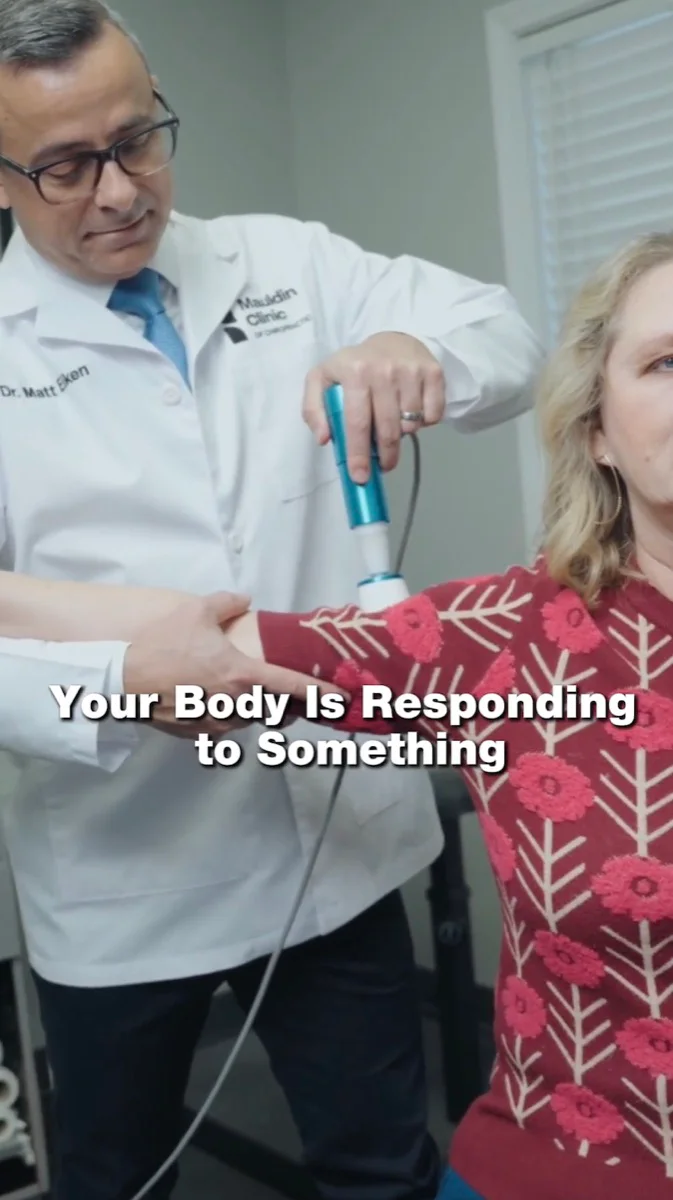
- The Mauldin Clinic. Opens on real treatment with a curiosity line on screen: “Your body is responding to something.” It earns the next few seconds without selling anything.
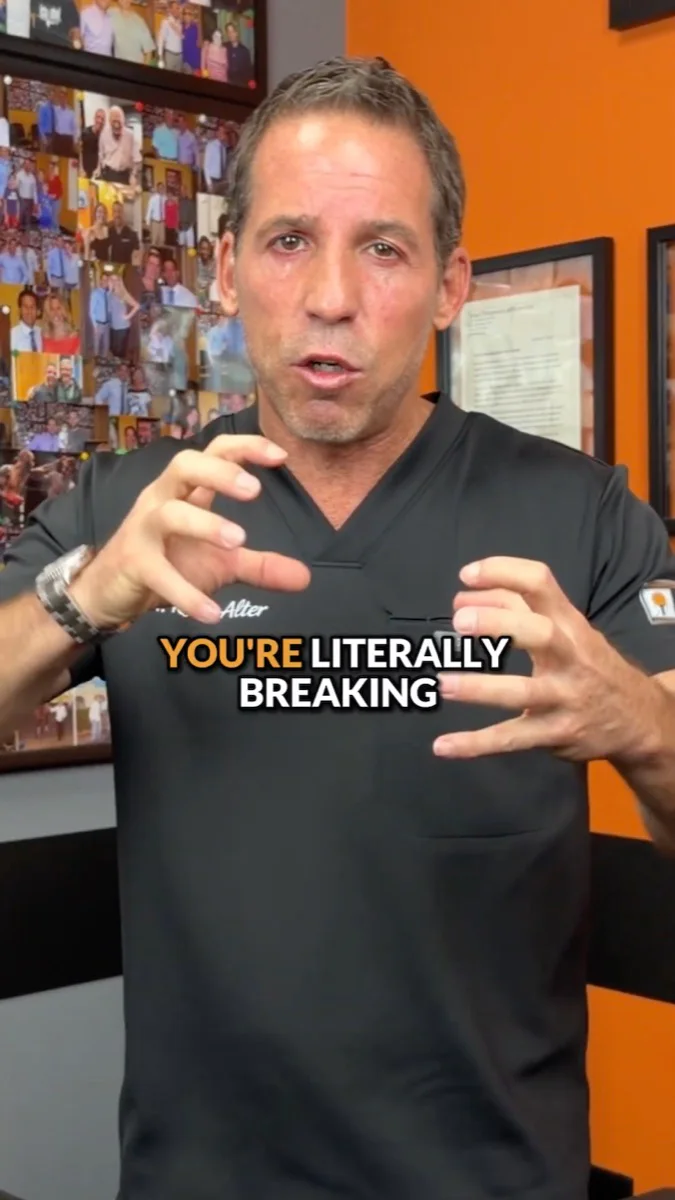
- Alter Chiropractic. Dr. Ryan Alter on camera, explaining one idea with bold captions. The captions carry the message for anyone scrolling with the sound off. Alter runs Facebook video ads with us alongside its website, local SEO and Google Ads.
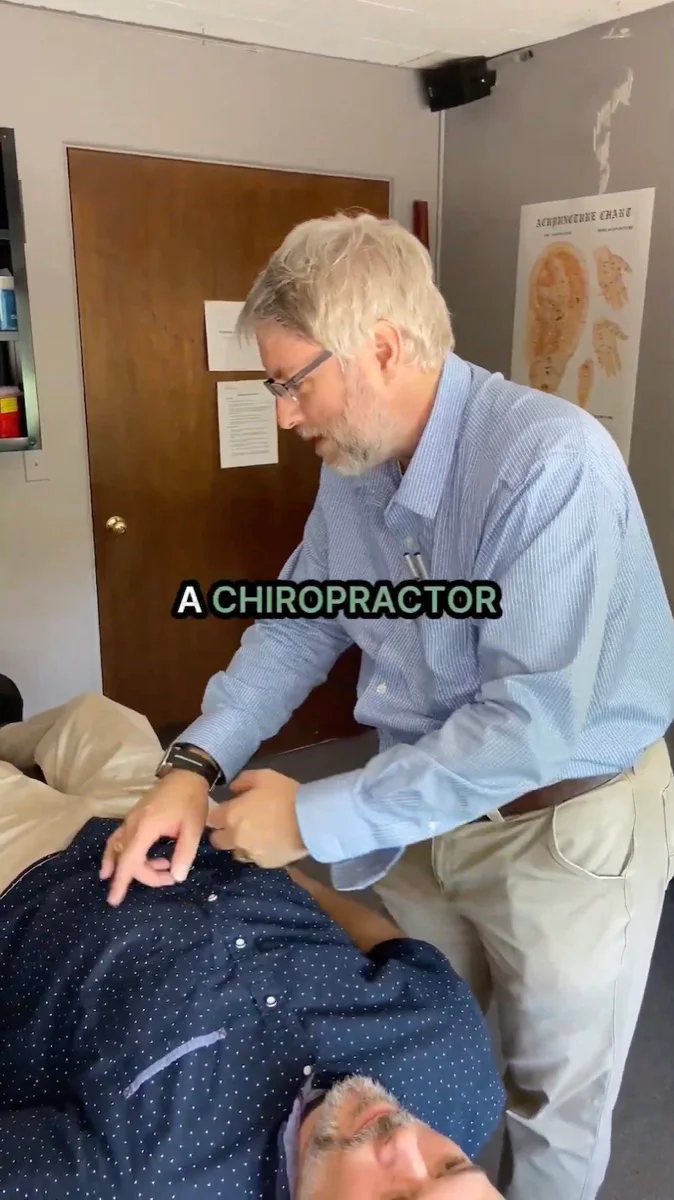
- North Star Integrated. Real adjustments with captions. Showing the care itself answers “what actually happens there?” for people who’ve never been to a chiropractor.
Retargeting video (stage 2)
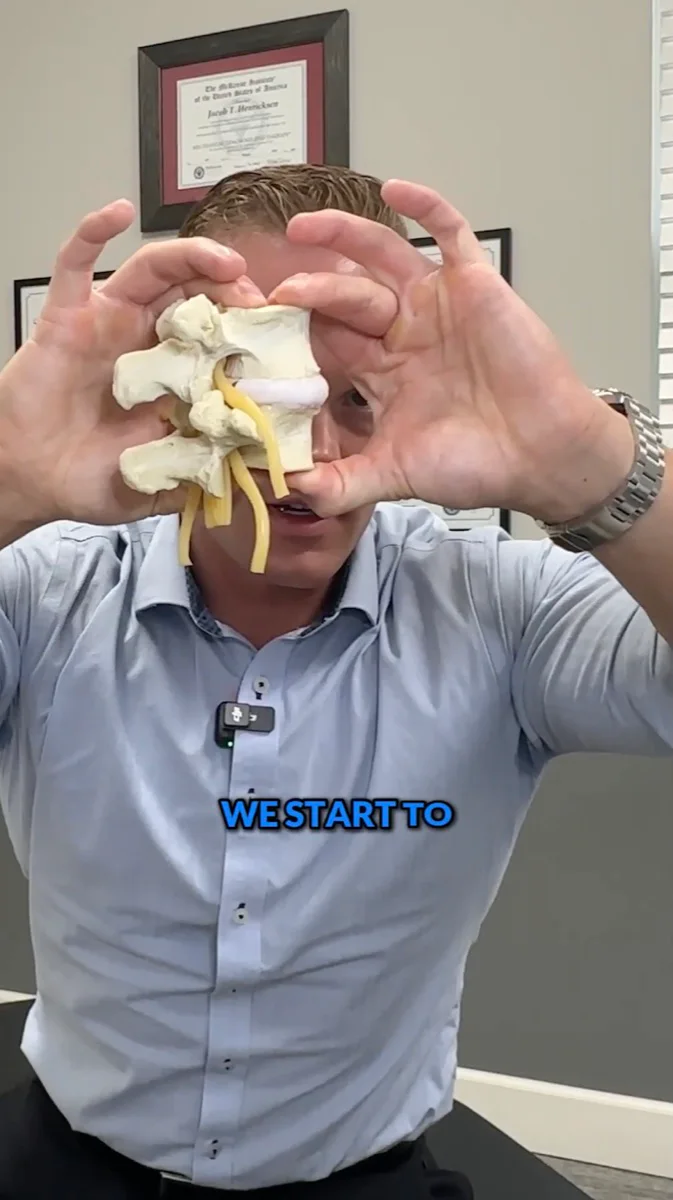
- Crystal Grove Chiropractic. Dr. Jacob Henricksen uses a spine model to explain what’s going on. This goes to people who’ve already watched an education video, so it can go one level deeper. Crystal Grove went from 1 to 3 new patients a week to a steady 5 to 15 with us running its website, Google Ads, Facebook Ads, social media and SEO.
Offer ads (stage 3)

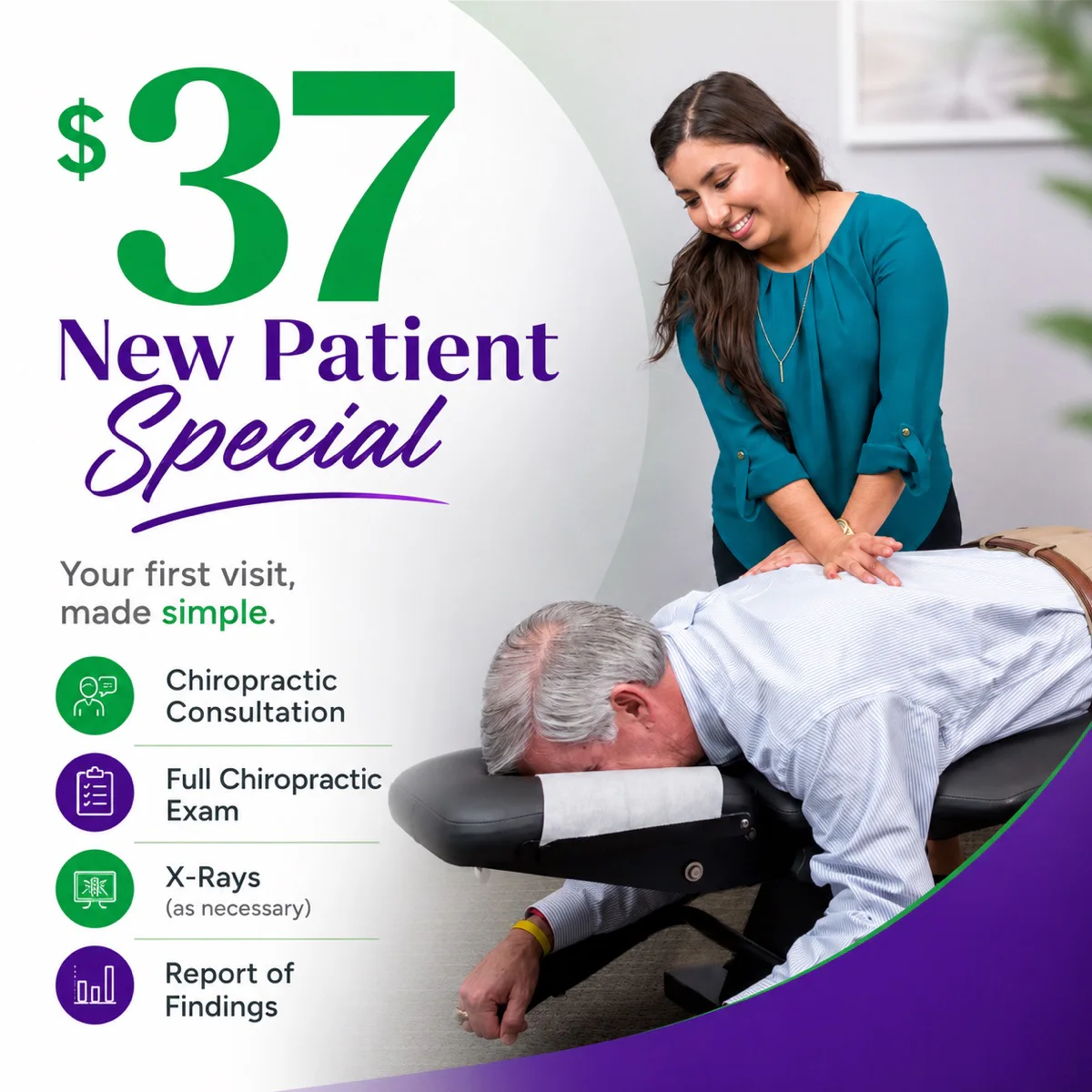




- Kingfisher Chiropractic, $47. A big, plain headline (“Get Checked”), the price, and a short list of what’s included. Simple wins.
- Rodgers-Stein Chiropractic, $37. “Your first visit, made simple.” Four icons spell out the visit, so nobody has to guess what they’re paying for.
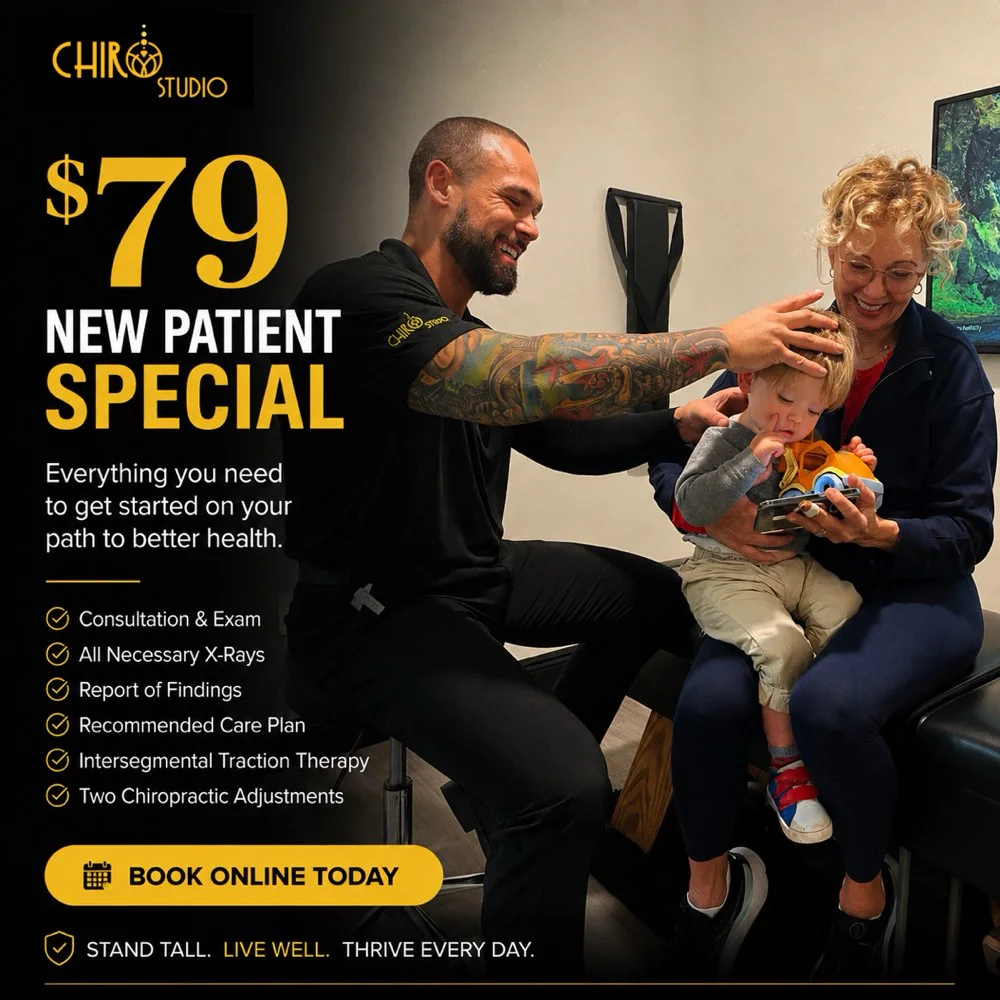
- Chiro Studio, $79. A higher price with a longer list, including two adjustments, and a “Book online today” call to action.
- Crystal Grove Chiropractic, $97. The doctor explaining a spine model to a patient, which matches the retargeting videos the viewer has already seen.
- Douglass Chiropractic, $97. Short benefit headline (“Feel better, move better”) and the fine print: “Offer not available to Medicare patients.” Douglass runs Facebook ads with us alongside its website, local SEO, Google Ads and reputation management.
- Northstar Integrated, free exam voucher. A free first step with the phone number right on the image for people who’d rather call.
- Align Wellness Center, no price. Leads with “New Patient Exam & Consultation” and four photos of real care. Some practices would rather filter for people who aren’t shopping on price.
Facebook Ads Case Studies
Here’s what the full system has done for practices we work with. Most of them run more than one channel with us, so each result is the whole program, and the channels are listed next to it.
| Practice | Result | Channels we run |
|---|---|---|
| The Ridge Chiropractic, Columbia, KY | 108 new patients in month one (goal was 60), 400+ in four months. Dr. McQueary says most first visits came from the Facebook ads and the website. | Website, Google Ads, Facebook Ads |
| Wave Chiropractic, Bradenton, FL | 300+ new patients in about 10 months from a cold start, averaging 20+ a month | Website, Google Ads, Facebook Ads, Local SEO |
| Trident Health & Chiropractic, Spartanburg, SC | 20 to 30 new patients a month since opening, with a separate campaign for each service | Website, Facebook and Instagram Ads |
| Spine Pro, New Richmond, WI (three offices) | 50 to 60 new patients a month across three offices | Social and Facebook Ads, Website, Reputation Management, CRM and texting |
| Spinal Rehab of Lake Geneva, WI | Qualified new patients tripled, from 10 to 11 a month to 30 to 35 | Website, Local SEO, Facebook Ads |
| Crystal Grove Chiropractic, Lutz, FL | From 1 to 3 new patients a week to a steady 5 to 15 | Website, Google Ads, Facebook Ads, Social Media, SEO |
| Living Wellness Chiropractic, Columbia, MD | 9 new patients in the first three weeks, vs. 4 in the 11 weeks before | Website, Local SEO, Google Ads, Facebook Ads |
| Sarasota Chiropractic & Physical Therapy, FL | Dr. Kozma says patient referrals from the ads multiplied at least two to three times | Website, Local SEO, Facebook and Instagram Ads |
| The Chiropractor at Castlebury, Eagle, ID | Patients from digital marketing now close at the same rate as word-of-mouth referrals | Website, Local SEO, Facebook and Instagram Ads |
Trident and Spine Pro are the cleanest Facebook examples: paid social is the only ad channel we run for them.
Also running Facebook ads with us: Douglass Chiropractic, Destin, FL (Website, Local SEO, Google Ads, Facebook Ads, Reputation Management); Life Aligned Chiropractic, American Fork, UT (Website, Local SEO, Google Ads, Facebook Ads); Optimal Chiropractic, West Fargo, ND (Website, Local SEO, Facebook Ads); and Resilience Chiropractic, San Leandro, CA (Local SEO, Facebook Ads, CRM and texting). Their case studies report Google ranking results, not Facebook numbers.
Common Chiropractic Facebook Ad Mistakes
- Showing a discount to strangers. A new patient special shown cold attracts bargain hunters. Before working with us, The Chiropractor at Castlebury had run cheap, discount-driven offers that pulled in bargain hunters rather than patients who trusted the doctor.
- Judging the campaign by cost per lead. An $8 lead that never answers isn’t cheap. Judge by cost per new patient who shows up. Our lead quality guide shows the math.
- Slow follow-up. If leads sit until tomorrow, you’re paying for leads you’ll never reach. Automate the first touch, call within a minute, and keep following up every 48 hours.
- Ad copy that tells people what’s wrong with them. “Is your back pain…?” breaks Meta’s personal attributes rule and can get your ad account restricted. Describe the service instead.
- Running the same few videos for months. Your warm audience sees them again and again. Keep adding new videos to the library.
- Reporting clicks instead of patients. Impressions and clicks are easy to show and easy to grow. Ask for leads, bookings, shows and started care, with ad spend divided by each.
- Quitting before the audience is built. It takes 4 to 8 weeks just to build a retargeting audience big enough for steady leads, so don’t judge the system on patients in month one.
Should You Run Facebook Ads or Google Ads First?
For most practices, Google comes first. People searching “chiropractor near me” are ready now, and Google Ads puts you in front of them. Our Google Ads clients typically spend $1,000 to $1,500 a month, paid directly to Google, the same range as Facebook. Facebook builds demand among people who aren’t searching yet, which takes longer but grows the pool of people who know you. We cover the order in our 3-phase marketing plan for chiropractors.
The two work best together. Most of the practices in the case studies above run both, and someone who has watched five of your videos already knows your name when they finally search.
Chiropractic Facebook Ads FAQs
How much should a chiropractor spend on Facebook ads? Most practices we work with spend $1,000 to $1,500 a month on Facebook and Instagram ads, paid directly to Meta. Management is a separate fee. Put most of it behind educational videos and the rest behind retargeting and your offer.
Do Facebook ads work for chiropractors? Yes, when they run as a system. Educational videos build trust, retargeting keeps you in front of viewers, an offer converts them, and fast follow-up gets them in the door. A discount shown to strangers on its own usually brings low-quality leads.
What is the best Facebook ad strategy for chiropractors? A four-stage funnel: short educational videos shown to people near your office, retargeting to the people who watch, a new patient offer once they know you, and automated text, email and call follow-up until they book and show up.
How long do chiropractic Facebook ads take to work? Plan on 4 to 8 weeks for your retargeting audience to grow large enough to produce steady leads. Our plan is for each viewer to see your videos 20 to 30 times over 8 to 15 weeks, so this approach builds momentum rather than spiking in week one.
What is the best new patient offer for chiropractic Facebook ads? In the accounts we run, a $47 to $65 new patient special that includes the first adjustment usually performs best. It strikes the best balance between how many people book and the quality of those patients. Spell out exactly what the first visit includes.
Should chiropractors use Facebook lead forms or a landing page? Lead forms bring more, cheaper leads with lower intent. A landing page with a booking calendar brings fewer leads who are more likely to book and show. If your team can’t call every lead within minutes, the landing page is usually the better choice.
What is a chiropractic VSL? A video sales letter, or VSL, is a short video next to the booking calendar on your landing page. Ours run about 3 minutes: who you are, why people come in, what happens at the first visit, what the offer includes and how to book.
How fast should a chiropractor follow up on Facebook leads? Right away. We send a text, an email and a phone call about 30 seconds after someone submits, so it feels like a person reached out. Then we follow up every 48 hours, at least five more times, mixing texts with calls and voicemails.
Can a chiropractor mention back pain in a Facebook ad? Yes, but describe your service, not the viewer. Meta’s ad rules ban copy that asserts or implies someone has a health condition. “Back pain care, new patients welcome” describes a service. “Is your back pain getting worse?” implies the reader has it.
What is a good cost per lead for chiropractic Facebook ads? Across our Facebook ads clients, leads average $20 to $40 each. LocaliQ’s 2026 benchmark for physicians and surgeons is $32.14, with no chiropractic breakout. Cost per lead matters less than cost per new patient who shows up, so track every lead to the first visit.
What videos should a chiropractor run as Facebook ads? Short videos, about 90 seconds, of you explaining a condition you see every week, sharing a few tips viewers can use today, and explaining how your office helps. Teach, don’t sell. A library of 12 to 24 videos gives you enough to rotate.
Get Started
If you’re starting from scratch, film your first five videos this month using the five-part script: one each on headaches, sciatica, posture, sleep positioning and disc problems. Launch them to your local area, build the retargeting audience, and keep filming until you have 12 to 24. Then add the offer, the booking page with the VSL script above, and the follow-up.
If you’d rather have it built for you, that’s what we do every day with Facebook ads for chiropractors: the videos, the retargeting, the offer and landing page, and the follow-up in ENGAGE. See what our programs cost, or book a free call and we’ll look at where your practice is today and what the first 90 days would look like.
Keep reading
Facebook Lead Quality for Chiropractors: Why More Leads Can Mean Fewer Patients
More Facebook leads is not the same as more patients. Here is the 6-step friction ladder for trading lead volume for lead quality, and how to pick the right step for your practice.
AEO & GEO for Chiropractors: How to Get Your Practice Recommended by AI
AEO and GEO are two names for one goal: getting your practice cited and recommended inside AI answers. Here's the practice-focused hub guide, built on your SEO foundation.
GEO vs SEO for Chiropractors: What's the Difference?
SEO gets your practice ranked. GEO gets it cited inside the AI answer. Here's how they differ, where they overlap, and why chiropractors need both in 2026.
Want this kind of strategy built for your practice?
Book a free consultation. We'll audit your current marketing and map out the omnipresence plan for your local market.
Book A Free Consultation